Executive Summary
The AI coding agent landscape has matured significantly in 2025. This comprehensive report evaluates 15 leading tools across 8 critical categories, revealing clear patterns in performance, usability, and value.
Key Findings:
- For Professionals: Claude Code and Cursor emerge as the top choices for production work
- For Tinkerers: Aider and Continue offer the best balance of flexibility and power
- For Casual Users: GitHub Copilot and Claude Code provide the smoothest onboarding experience
- Surprise Winner: Windsurf shows promising innovation in context management
- Notable Trends: Multi-file editing and agentic workflows are now table stakes
Report Highlights
Evaluation Methodology
We tested each tool across 8 dimensions:
- Code generation accuracy
- Context awareness
- Multi-file operations
- Debugging capabilities
- Learning curve
- Integration quality
- Performance & speed
- Cost-effectiveness
Top Performers
🏆 Overall Champion: Claude Code
- Exceptional context understanding
- Best-in-class multi-file editing
- Strong debugging capabilities
- Professional-grade reliability
🥈 Runner-Up: Cursor
- Superior IDE integration
- Excellent code completion
- Strong for medium-sized projects
- Great balance of features
🥉 Best Value: Aider
- Outstanding cost-effectiveness
- Powerful CLI workflow
- Excellent for experienced developers
- Git integration excellence
Category Winners
- Context Awareness: Claude Code, Windsurf
- Code Quality: Claude Code, Cursor
- Speed: GitHub Copilot, Continue
- Flexibility: Aider, Continue
- Learning Curve: GitHub Copilot, Claude Code
- Cost: Aider, Continue (open source)
- Integration: Cursor, GitHub Copilot
- Innovation: Windsurf, Cline
Detailed Analysis
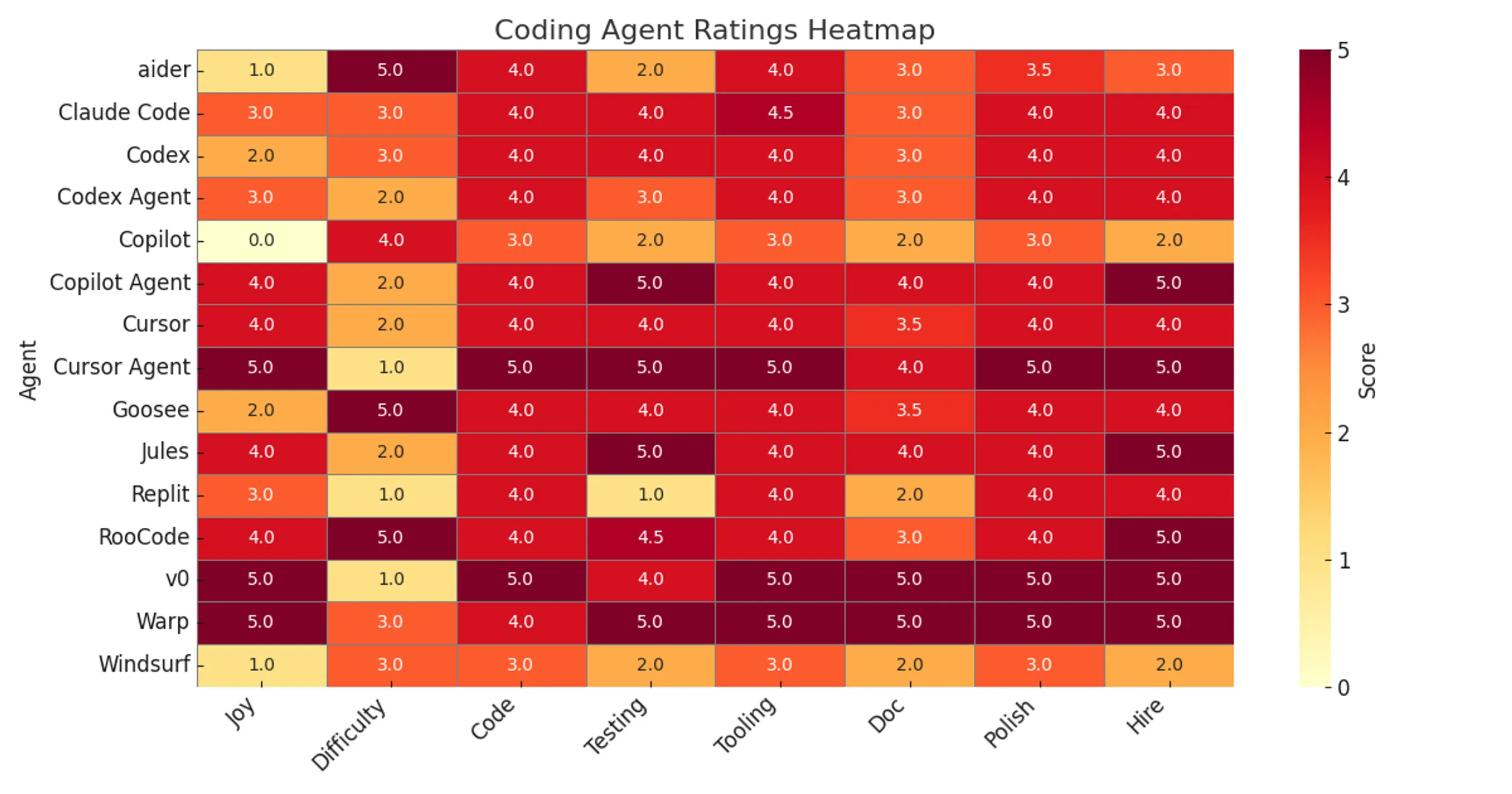
The Heatmap
Our comprehensive evaluation matrix reveals performance patterns across all tools:

Figure 1: Comparative performance across 15 AI coding agents evaluated on 8 key dimensions
Tool Categories
Tier 1: Production-Ready
- Claude Code
- Cursor
- GitHub Copilot
Tier 2: Power User Tools
- Aider
- Continue
- Windsurf
- Cline
Tier 3: Specialized Use Cases
- Remaining tools excel in specific scenarios
Key Insights
1. Context is King
The top performers consistently excel at maintaining context across:
- Multiple files
- Long conversations
- Complex codebases
- Cross-references and dependencies
Tools that struggle with context, even if they generate good code snippets, fall behind in real-world usage.
2. The IDE Integration Divide
There’s a clear split between:
- Native IDE tools (Cursor, GitHub Copilot) - Seamless but limited
- Standalone tools (Claude Code, Aider) - More powerful but require workflow adaptation
Your choice depends on whether you prioritize convenience or capability.
3. Agentic Workflows are Essential
The ability to:
- Plan multi-step changes
- Execute autonomously
- Handle errors gracefully
- Iterate on solutions
…is no longer optional. Tools without these capabilities feel primitive by comparison.
4. Cost Varies Wildly
Monthly costs range from:
- $0 (Open source: Aider, Continue)
- $10-20 (Copilot, some Cursor tiers)
- $20-40 (Claude Code, premium tiers)
- $100+ (Enterprise solutions)
ROI varies dramatically based on use case.
Recommendations by Use Case
For Professional Development Teams
Primary: Claude Code
- Best overall capabilities
- Enterprise-grade reliability
- Strong context management
Alternative: Cursor
- Better IDE integration
- Lower learning curve
- Strong team features
For Solo Developers / Freelancers
Primary: Cursor or Claude Code
- Depends on IDE vs standalone preference
- Both offer excellent ROI
- Strong community support
Budget Option: Aider
- Excellent capabilities for free
- Requires comfort with CLI
- Great for experienced devs
For Learning / Experimentation
Primary: GitHub Copilot
- Lowest learning curve
- Familiar IDE integration
- Good balance of help vs autonomy
Alternative: Continue
- Free and open source
- Highly configurable
- Good learning tool
For Large Codebases
Primary: Claude Code
- Best context handling
- Strong multi-file operations
- Handles complexity well
Alternative: Windsurf
- Innovative cascade approach
- Good for exploration
- Still maturing
Future Outlook
Emerging Trends
- Context window expansion - Tools are rapidly increasing from 32k to 200k+ tokens
- Agentic autonomy - More sophisticated planning and execution
- Multi-modal inputs - Screenshots, diagrams, voice commands
- Cost optimization - Better use of smaller models for routine tasks
- Specialized models - Language and framework-specific fine-tuning
Watch These Spaces
- Windsurf - Innovative approaches to context management
- Cline - Strong community, rapid iteration
- Continue - Open source flexibility, growing ecosystem
Conclusion
The AI coding assistant landscape has consolidated around a few clear winners while maintaining a healthy ecosystem of specialized tools.
For most developers, we recommend:
- Start with Claude Code or Cursor for primary work
- Keep Aider or GitHub Copilot as a secondary tool
- Experiment with Windsurf or Continue for specific use cases
The tools are now mature enough for production use, but the field continues to evolve rapidly. Expect significant improvements in context handling, agentic capabilities, and cost-effectiveness over the next 12 months.
Download Full Report
📊 Download the Complete PDF Report (1.9 MB)
The full report includes:
- Detailed methodology
- Individual tool reviews
- Benchmark results
- Code examples
- Cost analysis
- Integration guides
- Setup instructions
About This Research
This report was produced by Focus.AI Labs as part of our ongoing research into AI-assisted software development. We maintain independence from all tool vendors and receive no compensation for our recommendations.
Research Team: Will Schenk Publication Date: June 2025 Version: 1.0
Questions or feedback? Contact us at [email protected]
Will Schenk June 15, 2025